
Know where your people are
When members choose live sharing, see their locations on the trip map. Check the sharing status, latest update and phone battery before deciding whether to call or message.
A little further, together
Give your next trip a place of its own. Orbily brings a shared itinerary, your stops on the map and your people together in one temporary orbit.
See how it worksTrip planning in Orbily · Private beta
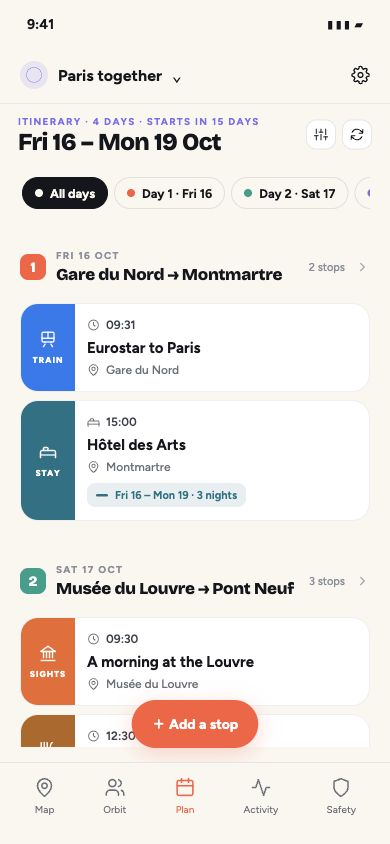
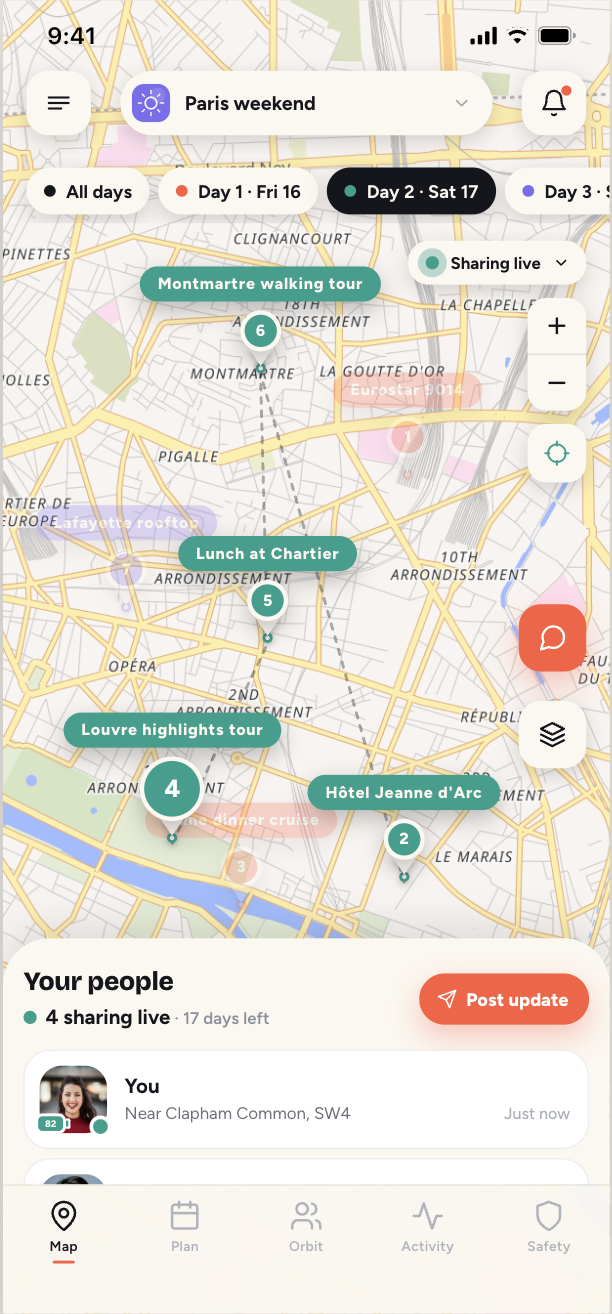

Your day-by-day plan and your trip map, together.
Four days. One shared plan.
A weekend in Paris, with room for the things you’ve booked and the moments you haven’t. Here’s how one trip comes together.
Fri 16 Oct
Take the train to Paris and check into your hotel. Add a three-night stay once and it carries through the plan.
Sat 17 Oct
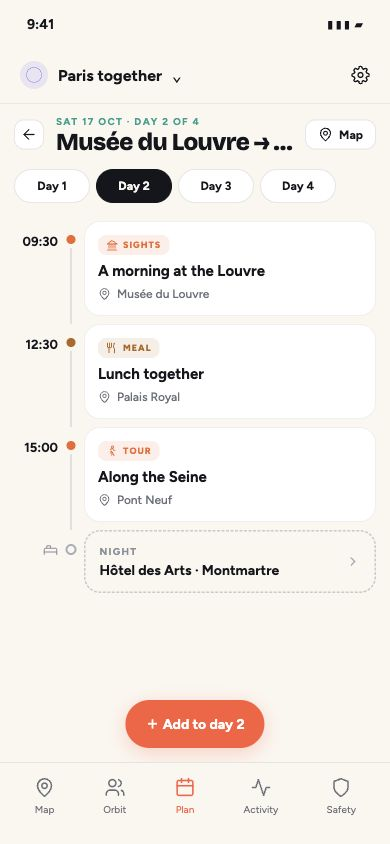
A morning at the Louvre, lunch together and a walk along the Seine. Keep the time and place with each stop.
Sun 18 Oct
Explore Montmartre, leave the afternoon free and come back together for dinner. There’s room to be spontaneous.
Mon 19 Oct
Check out, enjoy the morning and meet at the station for the train home. Everyone knows what’s next.
Your people are part of the plan
A day out can take everyone in different directions. Keep your group’s shared locations, meeting points and check-ins in the same orbit as the plan.
When members choose live sharing, see their locations on the trip map. Check the sharing status, latest update and phone battery before deciding whether to call or message.
If your child has a phone and is sharing in your orbit, you can see their shared location too. Agree a meeting point and check-ins before heading out, so a little independence comes with a way to stay in touch.
Check in when you reach the hotel, the museum or your meeting point. A check-in sends your chosen place and an optional message to the orbit’s chat and map.
An SOS alerts your orbit with a snapshot of where you are. Members can respond with “I’m on it”, so you can see that someone is responding. SOS and check-ins are free on every plan.
A shared location is a useful way to stay connected, not confirmation that someone is safe. Updates depend on the person’s phone, permissions and connection. Keep in touch directly and continue to supervise children.
How SOS and check-ins workThe whole trip, in order
Open Plan to see your trip unfold day by day. Travel, stays, meals and things to do sit in order, with times and places close at hand.
Choose a day to see its timeline. Add a stay once with its check-in and check-out, and Orbily carries it through the relevant nights. Leave room for free time, too.
Illustrative itinerary, rendered using the app’s planning components.
Put the plan in its place
Choose a day on the map to bring its stops into focus. Numbered pins and dashed lines show what comes next, while the rest of the trip fades into the background.
Tap a stop for its details, or switch back to All days for the big picture. Lines show the order of your stops, rather than a walking or driving route.
The Your people sheet keeps sharing status and member updates close by. Your itinerary tells you where you’re going; shared locations help you find each other along the way.
Start with your people
Give the trip a name and choose when the orbit ends. An orbit is your private group for the people coming along.
Choose your first day before creating the orbit. The Plan tab becomes a day-by-day itinerary for your trip.
Share the orbit invite. Each person chooses how to take part, including whether to share their location with this group.
Start with your stay, then add travel, meals and things to do. Pick the day, time and place. Orbit admins add and update stops for everyone.
Plan swivels from a calendar to a day-by-day itinerary. Stays, trains, tours and more.

Your trip. Your people.
A place to check the plan, find the meeting point and share the moments along the way. Keep the trip with the people who are actually coming.
From a family holiday to a long weekend with friends, a temporary orbit gives the adventure a home of its own.
Add photos to events and keep the trip conversation in your orbit. The little details and the big memories have somewhere to belong.
Choose the temporary orbit’s end date. When it expires, sharing stops automatically. If you need longer, an admin can extend the orbit.
Location sharing is each member’s choice. Choose live sharing, a timer or updates only, and stop sharing whenever you want.
Choose how you shareThe family calendar is for everyday plans. Turn on “Plan the days” when creating a temporary orbit to give a trip its own itinerary, arranged between its start and end dates.
Choose “Plan the days” when you create the temporary orbit. The planning mode and first day are set at creation; an admin can extend the end date later.
Orbit admins add and edit stops. Everyone in the orbit can see the shared plan and open its details.
If your child has a phone and is sharing their location in your orbit, their shared position appears on the map. Location information depends on their phone, permissions and connection, so check the latest update and keep in touch directly. Orbily supports family coordination; it cannot confirm someone is safe or replace adult supervision.
No. Each member chooses how to take part in each orbit. Updates only is an option, and people can still see the plan, check in and send an SOS without live sharing.
Orbily is not an emergency service, so contact the local emergency services first if someone is in danger; Orbily does not call them for you. An SOS alerts the people in your orbit with a location snapshot; it does not turn on live sharing.
The dashed lines connect the selected day’s stops in order. They are a visual guide to the plan, not turn-by-turn directions.
Orbily is in private beta for iOS and Android. Join the beta to hear when your invitation is ready.
Your next adventure starts here
Bring your people. We’ll help you keep the plan together.
We only use your address for beta invitations and related updates. By joining, you ask us to email you about the beta. You can withdraw at any time. Privacy policy · Terms & conditions
Private beta · iOS & Android